Automatic data protection for storage volumes
Data backup that’s on by default. Embedding policy creation into virtual server provisioning so customers protect their storage volume data from the very first minute — no extra steps.
SHIPPING SOON
Role
Product designer
TIMELINE
May 2026
TEAM
1 developer 1 architect 1 product manager
SKILLS
UX Design UX Research
OVERVIEW
How do we make volume data backup for virtual servers a more seamless process?
Content
Content
Content
Content
Content
Content
Content
PROBLEM
Content
Content
MAPPING USER FLOWS

RESEARCH
Content
Content
KEY INSIGHT #1
Content
Content
KEY INSIGHT #2
Content
Content
KEY INSIGHT #3
Content
Content
“
I prefer [backing up] the boot volume by default. The only situation where it doesn't make sense is when we have a Kubernetes cluster or a template or whatever it is where the boot volume is always the same.
Senior SRE · multi-cloud SaaS
DESIGN PROCESS
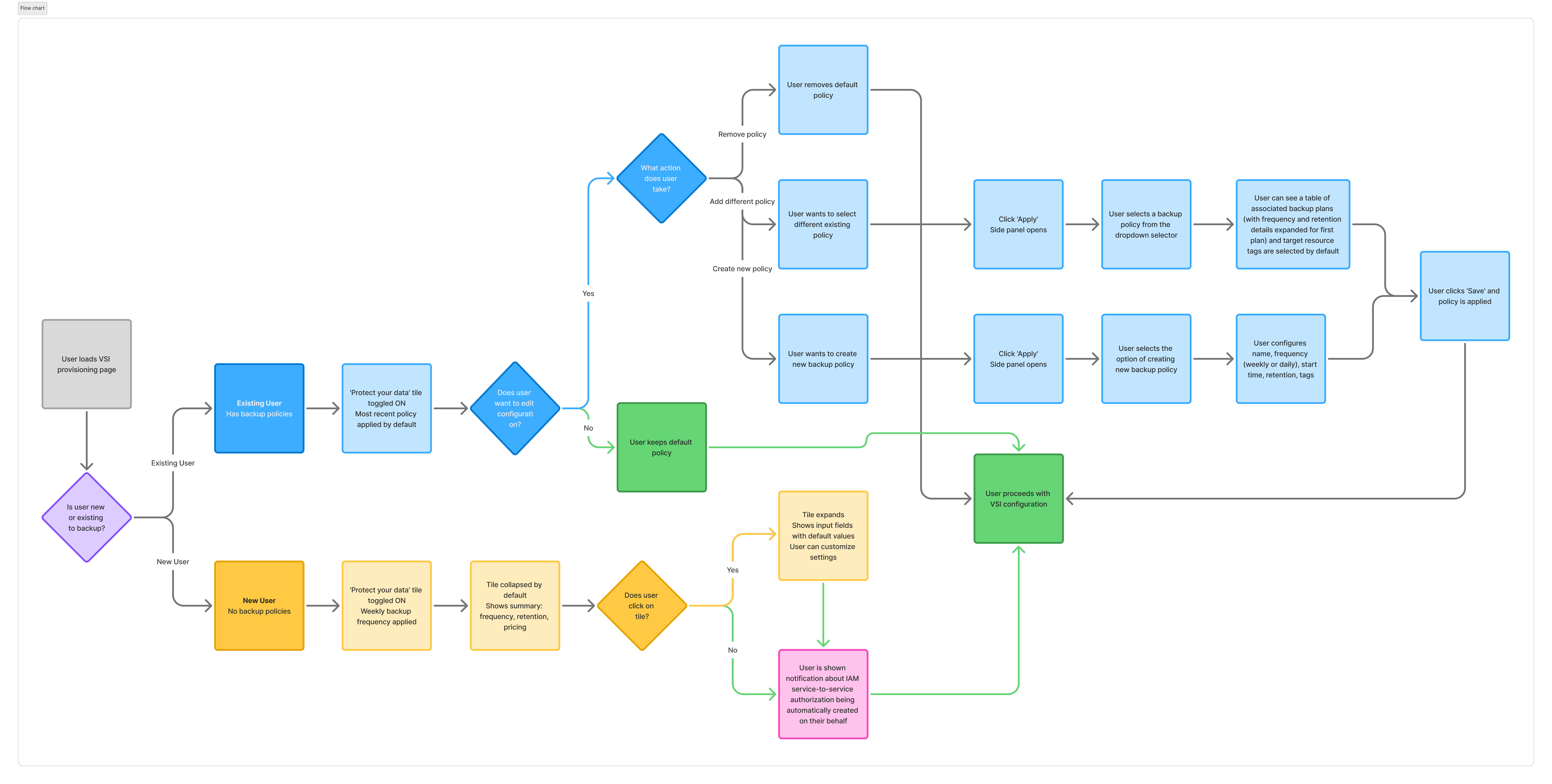
New and existing backup customers are expected to take different journeys
One of the more challenging aspects of this project was designing for both new and existing backup policy customers while keeping the interaction patterns consistent — it was making one tile behave sensibly for everyone. I mapped five entry states and the action each user could take, so the “Protect your data” tile always defaults to something safe while staying fully editable.
MAPPING USER FLOWS
SOLUTION
On by default: Data protection integrated within VSI provisioning
In this solution backup becomes a more natural part of creating a virtual server — on by default, transparent about cost and permissions, and flexible enough for power users to bend to their exact schedule without leaving the page.
On by default,
collapsed by default
The tile is toggled on with a weekly backup policy by default, and is collapsed to a summary (including frequency, retention, estimated price) so confident users aren’t slowed and cautious users can expand.
Customizability with
limited scope
As we validated from interviews, customers are more willing to accept system defaults when they're able to customize values depending on different needs or use cases. However, limiting the scope of customizability is also important to avoid overloading users with decision points.
IAM authorization
created automatically
A huge potential friction point for new backup policy customers is visitinga separate IAM page to manually create service-to-service authorization. In this solution, the system creates the authorization on the user's behalf automatically, sparing unnecessary manual effort.
IMPACT + RESULTS
Reducing time and number of clicks required to protect customer data
15
MINUTES SAVED
This solution vastly reduces the amount of time on average that customers spend to back up critical storage volumes after VSI provisioning has completed.
8+
CLICKS REDUCED
Because the option for data protection is now integrated directly within the VSI provisioning page
20%
ERRORS AVOIDED
The backup policy provisioning page is one of the pages with the highest UI error rates. By simplifying backup configuration and keeping it within the VSI provisioning context, errors are largely reduced.